Friday Fixes: Mobile First and the Skill That Saved Us
I spent this week doing QoL work on the blog — the kind of small spacing tweaks and admin shortcuts that sound trivial until you're three screenshot-debug cycles deep and wondering why you didn't just write down the viewport width. Seven fixes, two repos, one lesson that applies to anyone working with AI agents: if your agent keeps rediscovering the same thing, it's time to make it a skill.
1. The Subtitle That Wouldn't Fit
The problem: The homepage intro text — "Vibe coder. Dangerous coder. CEO of Coder. Thoughts are my own. Err… mine and my agent's." — wrapped to three lines on iPhone. The tagline should be punchy, not a paragraph.
The fix: Shortened the last sentence to "Thoughts are mine and my agent's." and dropped the font from text-lg (18px) to text-base (16px) on mobile with sm:text-lg to scale back up on larger screens. Two lines, clean break.
The text change was easy. Getting the font size right took a screenshot round-trip because I was guessing at character widths instead of doing the math.
2. Grep Pills: Death by a Thousand Pixels
The problem: The // GREP filter row — [*] [HOW-TO] [OPINION] [POPULAR] [+TAGS] — wrapped +TAGS to a second line on iPhone. Same for // SORT with NEWEST ↓.
The fix: Four small changes that collectively saved ~40px:
| Change | Savings |
|---|---|
Pill padding px-2.5 → px-2 | ~20px (4px × 5 pills) |
Pill tracking tracking-wider → tracking-wide | ~5px across all text |
Gap between pills gap-2 → gap-1.5 | ~8px (2px × 4 gaps) |
Label tracking tracking-widest → tracking-wider, margin mr-1 → mr-0.5 | ~6px |
Then I matched the // sort label styling identically to // grep — same tracking-wider, same mr-0.5, same gap-1.5 — so the NEWEST ↓ pill aligns vertically with the * pill above it.
The real problem: I made three attempts at this. First pass: reduced gaps. Still wrapped. Second pass: reduced tracking. Close but not quite. Third pass: reduced pill padding too. Finally fit. Each attempt required pushing to Vercel, waiting for deploy, and checking on the phone. That's 15 minutes per iteration to save 6 pixels.
3. Admin in the Hamburger Menu
The problem: The subtle "Admin" link lives in the footer. As the blog list grows, that's a lot of scrolling on mobile to reach it.
The fix: Added the same subtle "Admin" link to the mobile hamburger menu, styled with text-outline-variant/40 to match the footer's understated treatment. It sits below "Blog" and "About" — visible if you're looking for it, invisible if you're not.
One <Link>, eight lines of JSX.
4. Draft Preview Gets a Real Edit Bar
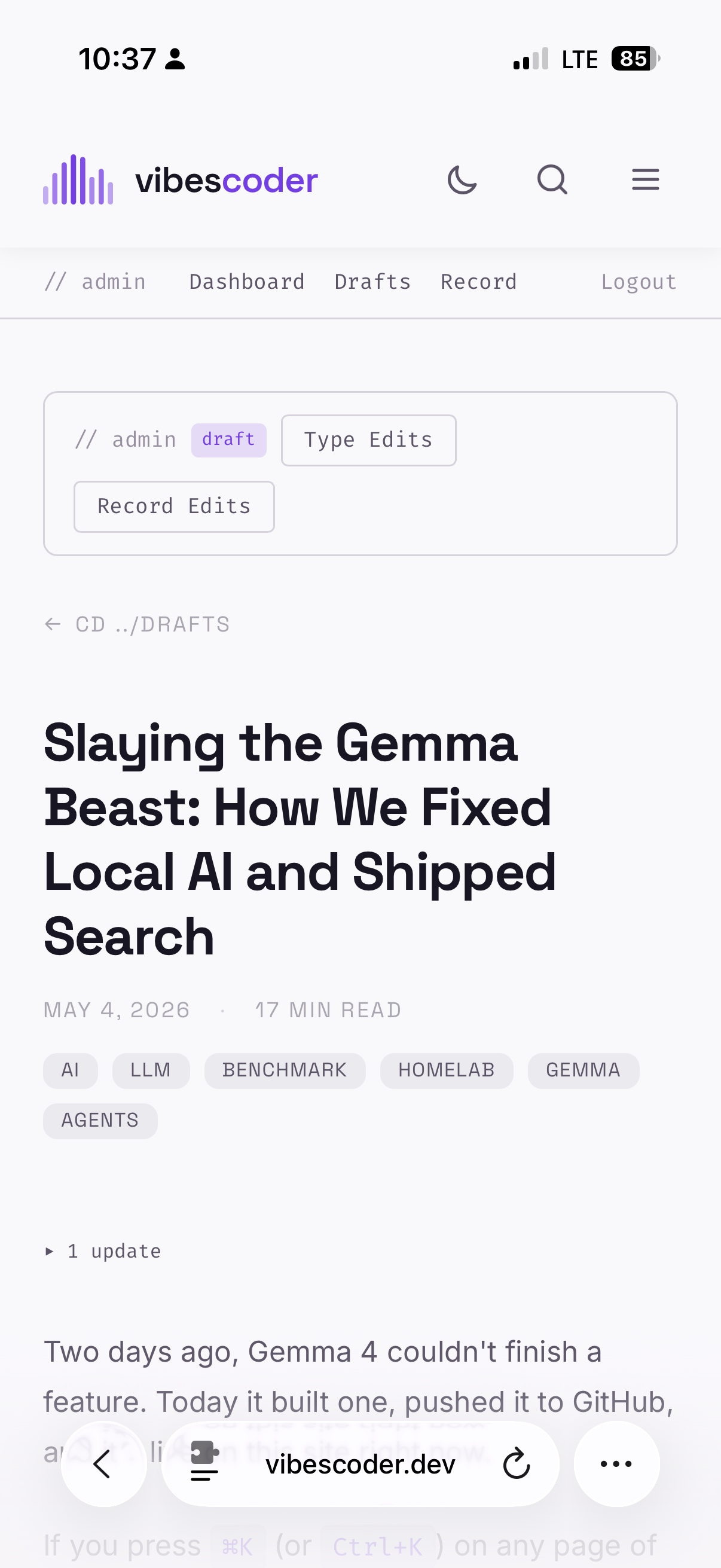
The problem: Clicking into a draft post from the admin showed a "draft preview" banner with a single "Edit →" link that went straight to the voice recording workflow. No way to just edit the text.
The fix: Replaced the banner with an // admin pillbox toolbar matching the style used on published posts. Two buttons: "Type Edits" (goes to the raw MDX text editor at /admin/edit/[slug]) and "Record Edits" (voice workflow). A draft badge appears when the post is unpublished.
While I was there, I also:
- Changed the "Edit" button on draft cards to go to the text editor instead of always routing to voice record
- Updated the
EditPostPickerdropdown on the dashboard to do the same - Made the "← back to post" link on the edit page smart — drafts link back to
/admin/preview/[slug]instead of the public URL (which 404s for unpublished posts)
5. Invalid Date Everywhere
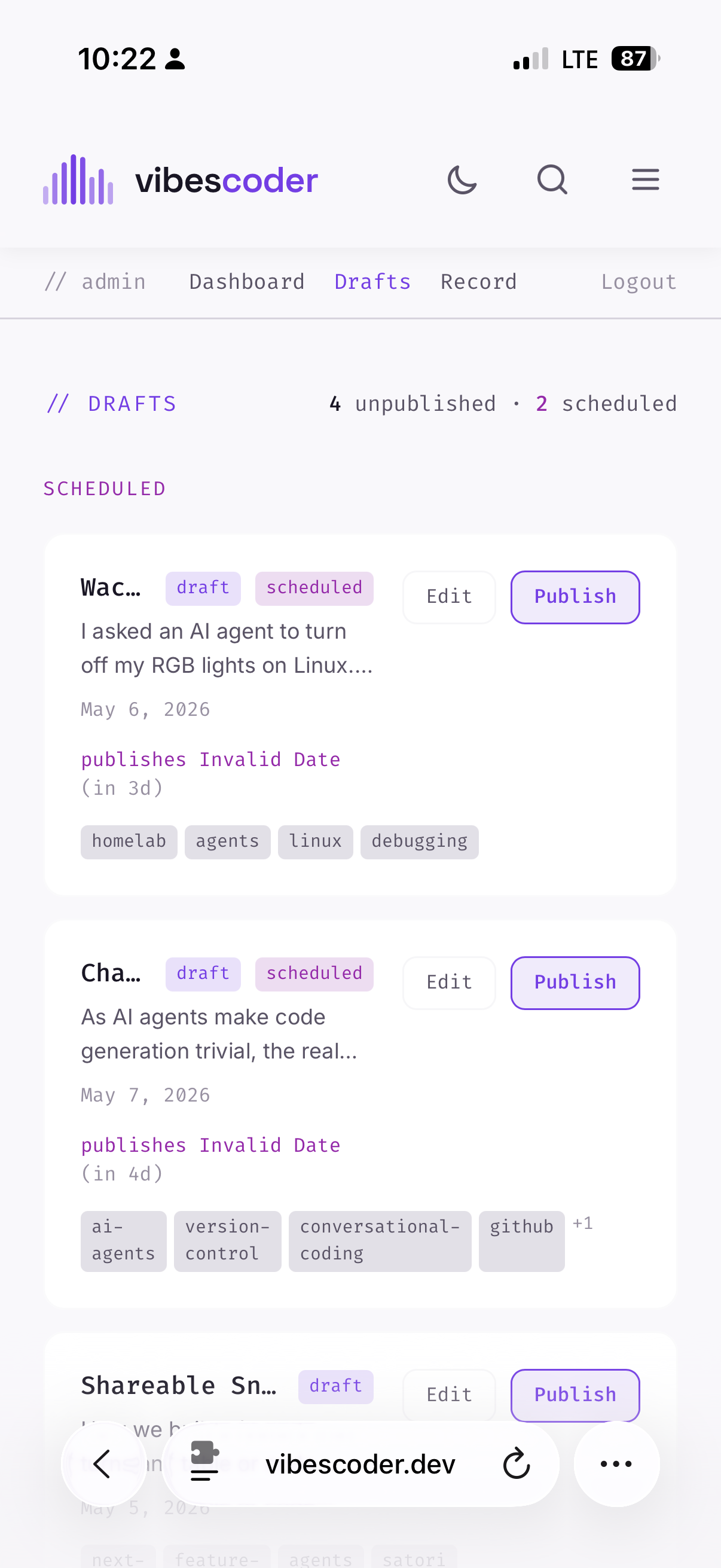
The problem: Two bugs causing "Invalid Date" in the admin UI.
Bug 1: Unquoted YAML date. The "Chat is the New Source Code" draft had date: 2026-05-01 without quotes. YAML interprets that as a Date object, which gray-matter serializes differently than a string. Downstream, new Date() on the result produced garbage.
The fix: Quote it: date: '2026-05-07'. Every other post already had quotes. This one slipped through because the agent generated the frontmatter and didn't follow the convention.
Bug 2: Double time suffix. The formatDate function in DraftsList.tsx appends T00:00:00 to date strings to avoid timezone shifts. But publishAt values are already full ISO datetimes like 2026-05-07T12:00:00Z. So formatDate("2026-05-07T12:00:00Z") produced new Date("2026-05-07T12:00:00ZT00:00:00") — invalid.
The same bug existed in EditPostPicker.tsx but with the opposite problem: it didn't append T00:00:00 at all, so plain date strings could shift by a day due to UTC interpretation.
The fix for both: Check if the string already contains T before appending, plus a NaN guard:
function formatDate(dateStr: string): string {
  const normalized = dateStr.includes("T")
    ? dateStr
    : dateStr + "T00:00:00";
  const d = new Date(normalized);
  if (isNaN(d.getTime())) return dateStr || "No date";
  return d.toLocaleDateString("en-US", {
    year: "numeric", month: "short", day: "numeric",
  });
}6. Draft Badges Eating the Title
The problem: On the drafts list, each card showed the title, a draft badge, and a scheduled badge all on the same row. On iPhone, the badges are shrink-0 and the title truncates — so titles got cut to three characters: "Wac…", "Cha…". Not useful.
The fix: Moved the badges from the title row down to the meta row alongside the date. The title now gets the full width of the card. Also removed the tag list from draft cards — they were eating vertical space without adding much value in a list view where you can click through to the full post.
7. The Skill File: Teaching the Agent to Measure
This is the one that matters.
Every spacing fix in this post followed the same pattern: I'd ask the agent to make something fit on one line, it would guess at sizes, I'd screenshot, it was wrong, repeat. The agent had no idea that my iPhone is 375px wide, that the page has px-6 padding (leaving 327px), or that a monospace 11px uppercase character is roughly 7px wide.
The root cause isn't bad prompting — it's missing context. The agent was rediscovering the same layout math every session. It would check layout.tsx for padding, calculate content width, estimate character widths, and still get it wrong because the estimates were rough and there was no feedback loop.
The fix: I added a "Mobile-First Layout Rules" section to the blog's agent skill file:
## Mobile-First Layout Rules

The primary device is an iPhone (375px viewport). Design for that first.

### Key measurements

- **Viewport**: 375px (iPhone SE/13 mini/14/15)
- **Page padding**: `px-6` (24px each side) → **327px content width**
- **Admin area padding**: `px-3` inside cards → **~295px usable inside a bordered box**

### Sizing guidelines

- When adding a horizontal row of pills/buttons, **calculate the pixel width first**.
  A monospace 11px uppercase character is ~7px wide. Add padding and gaps.
- Prefer `text-[11px]` + `px-2 py-1` for admin buttons.
- Use `gap-1.5` (6px) between pills/buttons on mobile, not `gap-2` (8px).
- Labels like `// grep` and `// sort` use `tracking-wider` (not `tracking-widest`).
- If a row is close to the limit, reduce tracking and padding before adding
  breakpoint hacks.

### Testing

- Always mentally compute: does this row fit in 327px (page) or 295px (card)?
- When in doubt, ask for an iPhone screenshot before iterating.This is 20 lines of Markdown that would have prevented three rounds of screenshot debugging. The agent reads this skill file at the start of every session. Next time someone asks for a row of buttons, it'll do the pixel math first instead of guessing.
The broader lesson: If you're working with AI agents and you find yourself correcting the same kind of mistake across sessions, the fix isn't a better prompt — it's a skill file. Skills persist. Prompts don't. The agent that wrote the tracking-widest pills in round one is the same agent that would have written tracking-wide from the start if it knew the viewport was 327px wide.
What I Learned
Do the pixel math, not the vibes math. "This should probably fit" is not a layout strategy. 327px is a number. Seven characters at 7px each plus 16px padding is 65px. That's a number too. When you're targeting a specific device, work in pixels, not feelings.
Skills are the compound interest of agent work. Every hour spent writing a skill file saves ten hours of future debugging. The spacing rules I captured this week will apply to every UI change for the life of the blog. The agent reads the file once and carries the context forever.
Date handling is a minefield. Between unquoted YAML, timezone-shifting UTC interpretation, and functions that assume their input format, I hit three different date bugs in one session. The defensive pattern — check for T, append T00:00:00 if missing, guard against NaN — should be the default, not the fix.
Admin UX matters even for one user. The hamburger menu shortcut, the text editor link on drafts, the smart back-button — each saves a few seconds. But when you're reviewing drafts on your phone while walking, those seconds are the difference between "I'll fix it later" and actually fixing it.
Files Changed
Engine repo (the-vibe-coder):
src/app/page.tsx— subtitle text + responsive font sizesrc/components/FilterBar.tsx— pill spacing, tracking, gap alignmentsrc/components/Header.tsx— admin link in hamburger menusrc/app/admin/preview/[slug]/page.tsx— admin pillbox toolbar for draftssrc/app/admin/edit/[slug]/page.tsx— smart back-link for draftssrc/components/admin/DraftsList.tsx— formatDate fix, badge layout, tag removalsrc/components/admin/EditPostPicker.tsx— formatDate fix, route to text editor
Content repo (the-vibe-coder-content):
- 4 draft posts — added/updated
publishAtdates - 1 draft post — quoted unquoted YAML date
Skill file:
.agents/skills/vibescoder-blog/SKILL.md— added Mobile-First Layout Rules section
What's Next: Back to the Homelab
Four drafts are now scheduled: Slaying the Gemma Beast (Sunday), Shareable Snippet Images (Monday), Wacky Wednesday (Tuesday), and Thursday Thought: Chat is the New Source Code (Thursday). The scheduled publisher will flip them live at 5:00 AM PT each day. By the time you read this, at least two of them should already be up.
We also decided to stick with TODO.md over GitHub Issues for task tracking. One file, one cat command, full context for the agent. Issues would scatter the same information across dozens of tickets. For a one-person-plus-agent operation, the flat file wins.
With the blog engine polished and a week of posts queued, the next priority is getting back to the homelab. Three new items hit the TODO this session:
-
Redo the performance shootout on pure llama.cpp. The original benchmarks in "Slaying the Gemma Beast" compared Ollama vs llama.cpp for Gemma 4, but I never ran the full model lineup through
llama-server. Download every benchmark model as GGUF, run the same todo-app prompt, and compare TTFT / tok/s / output quality against the Ollama results. Settle the speed question once and for all. -
Find the fastest capable local reasoning model. Not just raw tok/s — which model actually reasons well on structured tasks while still being fast? The Gemma 4 work showed that thinking tokens can silently eat your budget. I want a proper ranking across all available local models on a real reasoning task, scored on both speed and quality.
-
Configure the homelab to match my wife's Mac mini. She's the second Coder user and her hardware is different. What models and quantizations give a comparable experience on her machine? This is the "make it work for two people" step before I can call the local AI stack done.
All three feed into the bigger migration: moving everything off Ollama to llama.cpp. Better reasoning budget control, no invisible thinking token issues, and one fewer abstraction layer between the model and the metal. The Gemma 4 experience proved llama.cpp is faster — now it's time to make it the default for every model.
By the Numbers
- 7 fixes shipped across 2 repos
- 4 commits to the engine repo
- 3 commits to the content repo
- 3 screenshot round-trips to get spacing right (before the skill file)
- 20 lines of Markdown in the skill file that prevent future round-trips
- ~40px saved in the grep row through padding, tracking, and gap reductions
- 327px — the number every agent should know (iPhone content width with
px-6padding) - 0 new dependencies
- 4 drafts scheduled for automatic publishing over the next 5 days
- 3 new TODO items queued for the homelab llama.cpp deep-dive